Tracking progress
Write Label: value lines in your journal entries, like Duration: 45 min or Fell off: no, and Papers charts them for you. No forms or setup: you just write.
How it works
Start a line with a short label and a colon, then the value:
Duration: 1h 15m
Confidence: 7/10
Fell off: no
When the same label appears in at least two entries of a journal, the journal shows it under From your entries:
- Numbers get a small chart of how they’ve changed, with your latest value, your average, and (where adding up makes sense) a total.
- Short answers like yes and no get counted: “No ×7 · Yes ×1”.
Point at a chart to see the date and value of each entry. Click to open that entry.
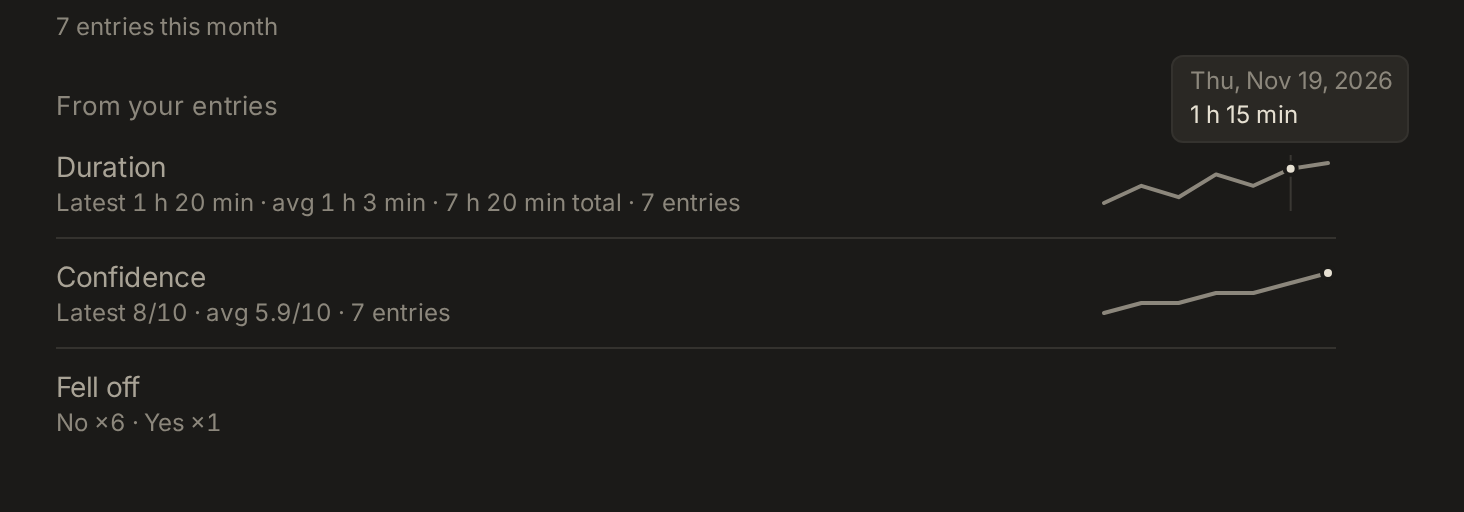
The easiest way to track something is to put its label in your journal’s starting text (see Journals), so every new entry asks for it.
What counts as a label
A line is read as Label: value when:
- it isn’t the entry’s first line (that’s the date title),
- the label starts with a letter and is four words or fewer,
- and there’s something after the colon.
| Line | Read? | Why |
|---|---|---|
Duration: 45 min |
Yes | |
Time in saddle: 1h |
Yes | |
Duration: |
No | Nothing after the colon yet |
What I learned about riding today: a lot |
No | The label is more than four words, so it’s a sentence |
See http://example.com |
No | A web address isn’t a value |
Labels ignore capitals and extra spaces, so Duration, duration and Duration : all count as the same thing. If a label appears twice in one entry, only the first counts.
Numbers
A value that starts with a number is charted.
Time
Durations are all converted to minutes, so you can write them however you like and they still line up on the same chart:
| You write | Counted as |
|---|---|
45 min, 45 mins, 45 minutes |
45 minutes |
3 hrs, 3 hours, 3h |
3 hours |
1.5 h, 1h 30m, 1h30, 1:30 |
1 hour 30 minutes |
3 hrs 30 mins, 3 hours and 30 minutes, 1 hr, 20 min |
as written |
90 seconds, 45 s |
1 min 30 s, 45 s |
Note
A plain
mafter a number, as in400 m, is read as metres, not minutes, because it could be either. It only means minutes after hours, as in1h 30m. For minutes on their own, writemin.
Scores
7/10, 7 / 10 and 7 out of 10 are all 7 on a scale of 10. Scores get a latest value and an average, but no total.
Everything else
Any other number keeps the first word after it as its unit: 4.5 km, 12 reps, 30 pages, or just 12.
1,200is twelve hundred. A comma with one or two digits after it is a decimal point:4,5 kmis 4.5 km.- A word like
about,around,roughlyor~in front is ignored:about 45 minis 45 minutes.
Totals appear for units that add up: minutes, km, miles, metres, reps, sets, pages, words, steps, kcal, laps, and plain numbers.
Mixed units: if you write a label in different units in different entries, its chart uses the unit you used most, and leaves the others out.
Values that are skipped
When a value could mean different things, Papers leaves it out rather than guess:
- Ranges, like
45-60 minor45 to 60. - Times of day, like
10:30amor6:30 pm.
Warning
A time written with a colon is always read as hours:minutes.
1:30is 1 hour 30 minutes, and25:30is 25 hours 30 minutes, not a 25-minute run. For minutes and seconds, write25 min(seconds after minutes aren’t added yet).
Short answers
A value that doesn’t start with a number, and is 24 characters or shorter, counts as an answer. Answers are tallied when they repeat:
Fell off: no      →   No ×7 · Yes ×1
Mood: good        →   Good ×12 · Okay ×4 · Low ×2
Capitals, quotes and end punctuation are ignored, so Yes!, "yes" and yes are the same answer.
A label isn’t tallied when every answer is different, as with Worked on: trotting, Worked on: canter, Worked on: jumps. That’s notes, not data, and it stays in your entries. Labels with more than six different answers aren’t tallied either.
Longer values, like Mood: pretty good overall today, are left as writing.
Why isn’t my label showing?
- It’s only in one entry. A label appears once it’s in at least two.
- The label is longer than four words, or doesn’t start with a letter.
- The values are in different units, and only one entry uses the most common one.
- Every answer is different, so it’s treated as notes.
- The entry is untouched. Entries you opened but didn’t write in aren’t counted.
Templates to copy
Paste one into Rhythm & template → Each entry starts with in a journal set to Whenever. Write each value with its unit, as in Squat: 80 kg or Distance: 5 km.
Riding or any lesson
Duration:
Worked on:
Went well:
To work on:
Confidence:

Notes:
Fill in Confidence: as a score, like 7/10.
Gym
Duration:
Squat:
Bench:
Felt:

Notes:
Running
Distance:
Time:
Effort:

Notes:
Write the time as 25 min or 1h 5m, not 25:30: Papers reads 25:30 as 25 hours 30 minutes.
Reading (set to Every day)
Pages:
Book:

Thoughts:
Mood (set to Every day)
Mood:
Sleep:
Grateful for:

What happened today?
Tip
Leave prompts empty in your template, with nothing after the colon. A prompt you don’t fill in is then simply skipped. If the template said
Squat: kgand you left it as it was, “kg” would be counted as an answer.