Settings
Change how your writing looks: the typeface, text size, line width and background. Changes apply instantly and are remembered.
Opening Settings
- On a computer: move the mouse, then click the gear icon in the sidebar on the right.
- On a phone: tap the menu button, then the gear icon at the top of the menu.
To close Settings, click the gear again, press Esc, click on your page, or just start typing.
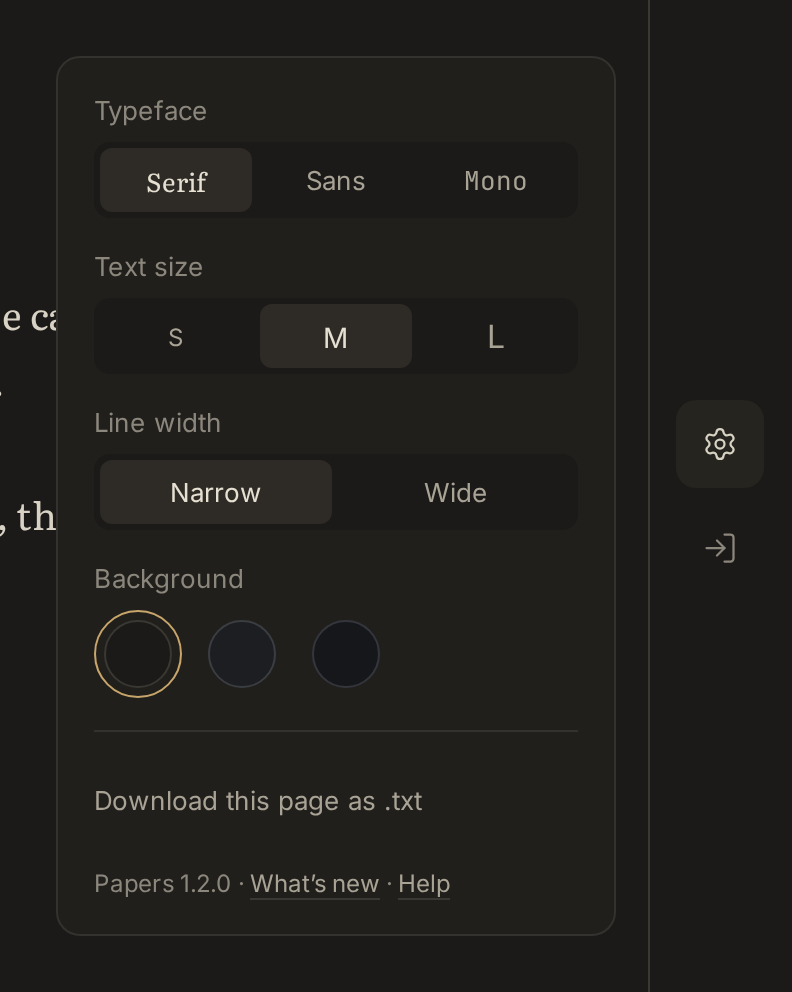
Typeface
| Option | Looks like | Good for |
|---|---|---|
| Serif | A book typeface (the default) | Long-form writing and reading back |
| Sans | A clean, modern typeface | Notes and lists |
| Mono | Every letter the same width, like a typewriter | Drafts, code, plain-text formatting |
Each option is shown in its own typeface, so you can see the difference before you choose.
Text size
S, M (the default) or L.
Line width
How wide the column of text is:
- Narrow (the default) keeps lines short, which most people find easier to read.
- Wide fits more on each line, for big screens.
There’s no line width setting on a phone, where the text always fills the screen.
Background
Three dark backgrounds: Ink (warm, the default), Graphite (cool grey) and Night (deepest). Only the background changes; the text stays the same colour.
Papers only has dark backgrounds. It was designed for long, calm stretches of writing, often late in the day.
Experiments
Early features live in their own panel: the flask icon just above the gear (on a phone, at the top of the menu). They may change, or go away.
Spell check has three choices:
- Off (the default).
- Browser uses your browser’s built-in checker, as it does on any web page.
- Hunspell is Papers’ own checker (English, US). Misspelled words get a soft wavy underline. Right-click one (or tap it on a phone, or press Alt+Enter with the caret in it) to pick a suggestion, Add to dictionary, or Ignore. The word you’re still typing isn’t underlined until you move on. The dictionary downloads the first time you choose Hunspell, then works offline.
Words you add are kept in this browser only.
Download this page
Download this page as .txt saves the page you’re on as a plain-text file, named after its title. See Pages.
Version, What’s new and Help
The last line shows which version of Papers you’re using, with links to What’s new and this help.
Are settings saved?
Yes. Your settings are remembered in this browser. If you’re logged in, they also follow you to your other devices.
“Not synced. Will retry.”
If you’re logged in and Papers hasn’t been able to sync for a few minutes, this line appears at the bottom of Settings. Your writing is safe on this device, and Papers keeps trying. See Accounts & sync.